Posts

Custom OpenCart 2.3.0.2 theme

Image
I was looking to customize the default theme in OpenCart 2.3.0.2 and realized that I will probably need to do quite a bit of work given there was no immediate “help” related on the subject. In essence it turned out to be a lot less painful than I thought. Here is what I did. Assuming new theme name “mytheme” and title “My Theme”. Make copies… To start with copy the  default  folder found in upload/catalog/view/theme/default to a new folder in the same directory. Name it “ mytheme “. Then copy the  theme_default.php  file in upload/admin/controller/extension/theme and place it in same directory. Name it “ mytheme.php “. + Rename the class to (line 2): ControllerExtensionThemeMyTheme + Replace all “ theme_default ” text to “ mytheme “. Yes there are a lot (197). Copy the  theme_default.tpl  in upload/admin/view/template/extension/theme and place it in the same directory. Name it “ mytheme.tpl “. + Replace all ...
PHP: Replace space in front of capitals in a string (Regex)

I have a number of strings which contain words which are bunched together and I need to seperate them up. For example ThisWasCool - This Was Cool MyHomeIsHere - My Home Is Here $String = 'TheCambodia'; $Words = preg_replace('/(?<!\ )[A-Z]/', ' $0', $String); echo $Words; Output: The Cambodia

How to display image from "image selection" field in transformation

Image
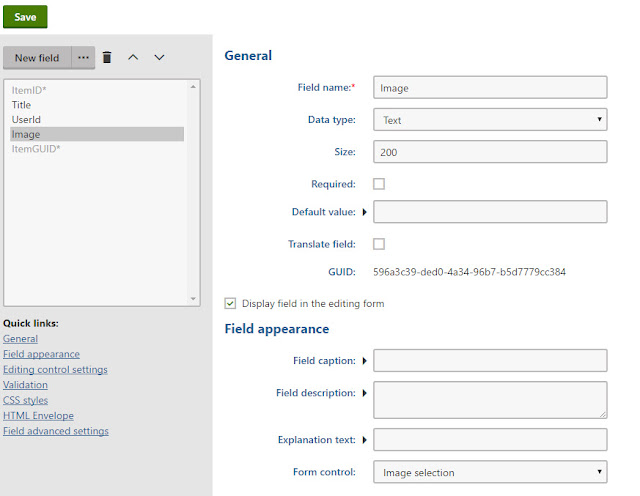
You can use following sample code: <img src="<%# GetDocumentUrl("Image", "") %>" />

Login failed for user 'IIS APPPOOL\DefaultAppPool'

Image
If you don't change, each app pool has it's own identity. In your case, just add a new user to your database SmallBakery with the name IIS APPPOOL\SmallBakery  using SQL Management Studio. You find the users list in the "Security/Users" subnode of your database. This should look something like that: For testing, let the user be member of the db_owner role. If that works, remove this role and just let it be member of db_datareader and db_datawriter. This way, each app pool (perhaps each website, if they all use their own app pool) only has access to the corresponding database. If you use Default Web Site so you add "IIS APPPOOL\DefaultAppPool"

SQL Server can't login with newly created user

Image
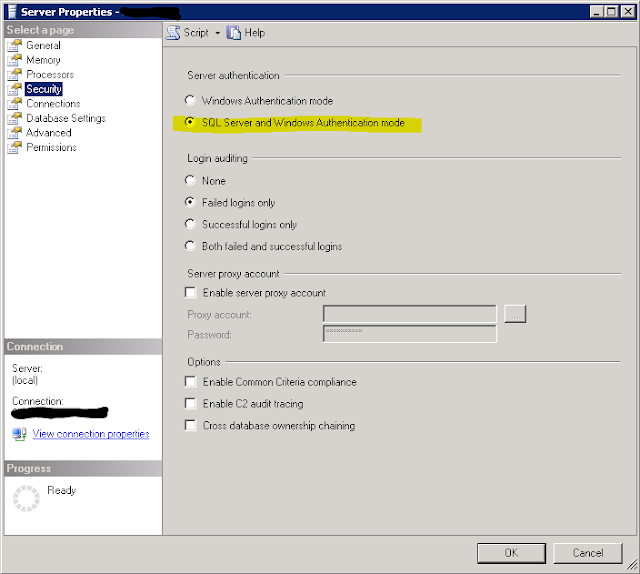
SQL Server was not configured to allow mixed authentication. Here are steps to fix: Right-click on SQL Server instance at root of Object Explorer, click on Properties Select Security from the left pane. Select the SQL Server and Windows Authentication mode radio button, and click OK Right-click on the SQL Server instance, select Restart (alternatively, open up Services and restart the SQL Server service).

How to exclude column save into database for Contact Form 7 DB

Image
When you submitted form data into database default Contact Form DB will insert all your data form into your database so if you want to exclude field something like Google Recaptcha not insert into database. You just go to Contact Form 7 DB --> Options then click on Save Tab. Add filed name that you want to exclude after "/.*wpcf7.*/,_wpnonce". /.*wpcf7.*/,_wpnonce,g-recaptcha-response

How to add Facebook Open Graph (og) meta tags to blog detail page in Kentico

Image
We can use Head HTML Code WebPart in your Page Template and using macros to populate your tags content. + Configure the WebPart      - Configure the webpart: fbgraph      -  Web part title: Facebook Open Graph      -  HTML code <meta property="og:title" content="{% BlogPostTitle %}" /> <meta property="og:site_name" content="Kentico 9" /> <meta property="og:url" content="{% CurrentDocument.AbsoluteURL #%}" /> <meta property="og:description" content="{% StripTags(BlogPostSummary) %}" /> <meta property="og:image" content="http://{% domain %}/getattachment/{% BlogPostTeaser %}/.aspx" /> <meta property="og:type" content="article" />