Posts

Showing posts with the label Contact form7

How to exclude column save into database for Contact Form 7 DB

Image
When you submitted form data into database default Contact Form DB will insert all your data form into your database so if you want to exclude field something like Google Recaptcha not insert into database. You just go to Contact Form 7 DB --> Options then click on Save Tab. Add filed name that you want to exclude after "/.*wpcf7.*/,_wpnonce". /.*wpcf7.*/,_wpnonce,g-recaptcha-response
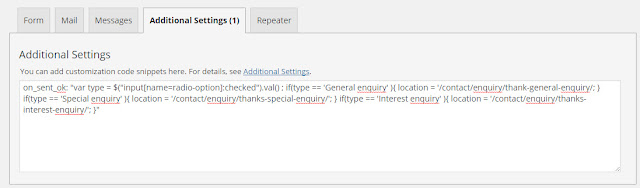
Contact Form 7: Redirecting on a condition in Additional Settings

Image
Redirecting without a condition When you use the WordPress plugin “Contact Form 7” you can redirect the user to another page after submitting the answers by the following code: on_sent_ok: "location.replace('http://www.redirectedtopage.com');" Redirecting on a condition If you want to make the redirecting depending on a specific answer, you can use the following code: on_sent_ok: " if (document.getElementById('type').value=='yes') {location.replace('http://www.redirectedpage1.com') } else { location.replace('http://www.redirectedpage2.com/') }" Or on_sent_ok: "var Iso = $("input[name=radio-option]:checked").val() ; if(Iso == 'General enquiry' ){ location = '/contact/enquiry/thank-general-enquiry/'; } if(Iso == 'Special enquiry' ){ location = '/contact/enquiry/thanks-special-enquiry/'; } if(Iso == 'Interest enquiry' ){ location = '/contact/enquiry/th...