Posts

Showing posts with the label Wordpress

How to exclude column save into database for Contact Form 7 DB

Image
When you submitted form data into database default Contact Form DB will insert all your data form into your database so if you want to exclude field something like Google Recaptcha not insert into database. You just go to Contact Form 7 DB --> Options then click on Save Tab. Add filed name that you want to exclude after "/.*wpcf7.*/,_wpnonce". /.*wpcf7.*/,_wpnonce,g-recaptcha-response
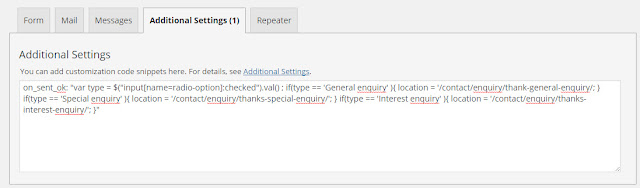
Contact Form 7: Redirecting on a condition in Additional Settings

Image
Redirecting without a condition When you use the WordPress plugin “Contact Form 7” you can redirect the user to another page after submitting the answers by the following code: on_sent_ok: "location.replace('http://www.redirectedtopage.com');" Redirecting on a condition If you want to make the redirecting depending on a specific answer, you can use the following code: on_sent_ok: " if (document.getElementById('type').value=='yes') {location.replace('http://www.redirectedpage1.com') } else { location.replace('http://www.redirectedpage2.com/') }" Or on_sent_ok: "var Iso = $("input[name=radio-option]:checked").val() ; if(Iso == 'General enquiry' ){ location = '/contact/enquiry/thank-general-enquiry/'; } if(Iso == 'Special enquiry' ){ location = '/contact/enquiry/thanks-special-enquiry/'; } if(Iso == 'Interest enquiry' ){ location = '/contact/enquiry/th...

Fixed FTP credentials for WordPress to connect to my local server

Image
I try to update WordPress or download plugins in I am directed to a page asking for the following information: Connection Information To perform the requested action, WordPress needs to access your web server. Please enter your FTP credentials to proceed. If you do not remember your credentials, you should contact your web host. Here is solution how to fix it define('FS_METHOD','direct'); to wp-config.php

WordPress: Fixed the Exceeds the Maximum Upload Error

Some host set the default upload size for WordPress to 2MB which is extremely low. This can cause an error when you try to upload files that are larger than this size.  After you locate the php.ini file you just need to change two values. Search for these two parameters below and set the value to be 32M and save. upload_max_filesize = 32M post_max_size = 32M

Custom Excerpt Function WordPress

By default WordPress excerpts are set to 55 words and there is an  excerpt_length filter   which allows you to change this default value to your length of choice. But what if you wanted a different excerpt length on your post type or somewhere in page you need create custom function for set limit. function get_excerpt($limit) { $excerpt = explode(' ', get_the_excerpt(), $limit); if (count($excerpt)>=$limit) { array_pop($excerpt); $excerpt = implode(" ",$excerpt).'...'; } else { $excerpt = implode(" ",$excerpt); } $excerpt = preg_replace('`[[^]]*]`','',$excerpt); return $excerpt; } function get_content($limit) { $content = explode(' ', get_the_content(), $limit); if (count($content)>=$limit) { array_pop($content); $content = implode(" ",$content).'...'; } else { $content = implode(" ",$content); } $content = preg_replace('/[.+]/','', $content);...

Display custom fields on order details page in Woocommerce

You can use WordPress function " get_post_meta " to echo out your custom field in "order-details.php" template. <?php echo get_post_meta( $order->id, 'custom-field-name', true ); ?>

WordPress: Defined Home and Site Url

WP_SITEURL , defined since WordPress Version 2.2 , allows the WordPress address (URL) to be defined. The value defined is the address where your WordPress core files reside. It should include the http:// part too. Do not put a slash " / " at the end. Setting this value in wp-config.php overrides the wp_options table value for siteurl and overrides the WordPress address (URL) field in the Administration > Settings > General panel when logging in using wp-login.php. It will _not_ update your Home url. Read more about this in depth in the link provided in the Note field: WP_HOME is another wp-config.php option added in WordPress Version 2.2 . Similar to WP_SITEURL, WP_HOME overrides the wp_options table value for home but does not change it permanently. home is the address you want people to type in their browser to reach your WordPress blog. It should include the http:// part and should not have a slash " / " at the end. If you won...

How to Disable Theme and Plugin Editors from WordPress Admin Panel

By default WordPress allows users to edit the theme and plugin codes through the admin panel. While it is a handy feature, it can be very dangerous as well. A simple typo can end up locking you out of your site unless ofcourse you have the FTP access. To prevent clients from screwing up the site, it is best to disable the theme and plugin editors from the WordPress admin panel. In this article, we will share with you a one line code that will disable theme and plugin editors functionality from WordPress. All you have to do is open your wp-config.php file and paste the following code: define( 'DISALLOW_FILE_EDIT', true ); 1. Removing theme editor link from menu using remove_action() function tcb_remove_editor_menu() { remove_action('admin_menu', '_add_themes_utility_last', 101); } add_action('admin_menu', 'tcb_remove_editor_menu', 1); 2. Removing theme editor link from menu using remove_submenu_page() add_action('admin_i...

WordPress admin menu slugs

Dashboard remove_menu_page(‘index.php’); Dashboard        remove_submenu_page( ‘index.php’, ‘index.php’ ); Updates remove_submenu_page( ‘index.php’, ‘update-core.php’ ); Posts remove_menu_page(‘edit.php’); Posts remove_submenu_page( ‘edit.php’, ‘edit.php’ ); Add New remove_submenu_page( ‘edit.php’, ‘post-new.php’ ); Categories remove_submenu_page( ‘edit.php’, ‘edit-tags.php?taxonomy=category’ ); Post Tags remove_submenu_page( ‘edit.php’, ‘edit-tags.php?taxonomy=post_tag’ ); Media remove_menu_page(‘upload.php’); Library remove_submenu_page( ‘upload.php’, ‘upload.php’ ); Add New remove_submenu_page( ‘upload.php’, ‘media-new.php’ ); Links remove_menu_page(‘link-manager.php’); Links remove_submenu_page( ‘link-manager.php’, ‘link-manager.php’ ); Add New remove_submenu_page( ‘link-manager.php’, ‘link-add.php’ ); Link Categories  remove_submenu_page( ‘link-manager.php’, ‘edit-tags.php?taxonom...

Removing menu pages from the WordPress admin

In this tutorial, I’ll cover the remove_menu_page() and remove_submenu_page() functions, which were added in WordPress 3.1. The first thing you need to decide is where you’re putting the code. I’ll assume you’re either dropping this in your theme’s functions.php file or one of your plugin files. 1. Removing top-level menu pages Usage remove_menu_page( $menu_slug ); Examples <?php function remove_menus(){ remove_menu_page( 'index.php' ); //Dashboard remove_menu_page( 'edit.php' ); //Posts remove_menu_page( 'upload.php' ); //Media remove_menu_page( 'edit.php?post_type=page' ); //Pages remove_menu_page( 'edit-comments.php' ); //Comments remove_menu_page( 'themes.php' ); //Appearance remove_menu_page( 'plugins.php' ); //Plugins remove_menu_page( 'users.php' ); //Users remove_menu...

How to Hide the WordPress Upgrade Message in the Dashboard

All you have to do is simply open the theme’s functions.php file and add this: add_action('admin_menu','wphidenag'); function wphidenag() { remove_action( 'admin_notices', 'update_nag', 3 ); }

Remove Admin Bar WordPress 3.1

WordPress 3.1 comes out with a new function called Admin Bar. This bar is added to your site (both on the dashboard and the site itself) if you’re logged in. Want to remove it? That’s quite easy, just read on Simply paste the following line of code on your functions.php file: remove_action('init', 'wp_admin_bar_init');

Remove Title Attribute from WordPress Menu Link

By default, WordPress menu functions, like wp_page_menu(), wp_nav_menu() or wp_list_categories() display menu links with title attribute. Here’s the code to remove it from wp_page_menu(), wp_nav_menu() and wp_list_categories() function:  function menu_notitle( $menu ){ return $menu = preg_replace('/ title=\"(.*?)\"/', '', $menu ); } add_filter( 'wp_nav_menu', 'menu_notitle' ); add_filter( 'wp_page_menu', 'menu_notitle' ); add_filter( 'wp_list_categories', 'menu_notitle' ); Put the code in your theme funtion.php and no more title attribute in the menu.

Set limit wp_nav_menu

<?php $pages = wp_nav_menu( array( 'container_class' => 'menu1' ,'menu'=> 'Main Navigation','theme_location' => 'menu1', 'menu_class' => 'dropdown', 'echo' =>false,'container' => false ) );?> <ul class="dropdown"> <?php $limit = 5; $pages_list = preg_replace(array('#^ ]*>#','#$#'), '', $pages); $pages_arr = explode("\n", $pages_list); for($i=0;$i<$limit;$i++){     echo $pages_arr[$i]; } ?> </ul>

Set limit wp_list_pages

<?php $numberPage = 5; $pages = wp_list_pages("echo=0&title_li="); $pages_arr = explode("\n", $pages); for($i=0;$i<$numberPage;$i++){ echo $pages_arr[$i]; } ?>

How to disable the WordPress Admin Bar

Image
WordPress 3.1 introduces a new feature called the Admin bar. A lot of people will be wanting to disable this when WordPress 3.1 comes out. But since some people might want to disable the admin bar for everyone, I thought I'd show you a  ways to quickly disable the WordPress admin bar 1. Login in admin page then click on All Users under user box 2. Edit all user that you want to disable then Un-Check on "When view site"

How to Show Home Link In wp_nav_menu

WordPress wp_nav_menu function is really helpful to display a custom navigation menus in your wordpress theme. The custom menu can be set in the admin area, easily, with a drag-and-drop interface You can use the code below as the solution: function my_page_menu_args( $args ) { $args['show_home'] = true; return $args; } add_filter( 'wp_page_menu_args', 'my_page_menu_args' ); Put the code in the theme function.php

Breadcrumbs in wordpress

global $post; // if outside the loop if (is_page() && $post->post_parent) { $parent_title = get_the_title($post->post_parent); echo ' » ' . $parent_title . ' » '; wp_title(''); } else if (is_page()) { echo ' » '; wp_title(''); } else { }

Display title of parent & sub page

global $post; if($post->post_parent) { $parent_title = get_the_title($post->post_parent); echo $parent_title; } else { wp_title(''); }

How to Add the Parent Category as a Class in body_class()

<?php $class=''; /* Make it void by default */ if ( is_single() || is_category() ) { /* Only do this if we're on a single post or category page */ $category = get_the_category(); $parent = $category[0]->category_parent; $class = get_cat_name($parent); /* assign the permalink name for the parent category to the object $class */ }?> <body <?php body_class($class); /* This will add our custom class, which is void if we aren't on a single post or category page */ ?>>