Posts

Showing posts with the label Kentico

Kentico Visible Webpart on parent page and hidden on child page

This should be returning true and display the field when I'm on this page /My-Parent/Tester and will hidden this page when page is /My-Parent. {% if(CurrentDocument.NodeLevel == 1 && ViewMode == "LiveSite") { return false; } #%}

Kentico Smart Search filter query by month name

;with CteMonths(n, m) AS( SELECT 1, 'January' UNION ALL SELECT 2, 'February' UNION ALL SELECT 3, 'March' UNION ALL SELECT 4, 'April' UNION ALL SELECT 5, 'May' UNION ALL SELECT 6, 'June' UNION ALL SELECT 7, 'July' UNION ALL SELECT 8, 'August' UNION ALL SELECT 9, 'September' UNION ALL SELECT 10, 'October' UNION ALL SELECT 11, 'November' UNION ALL SELECT 12, 'December' ) SELECT '+StartDate' AS StartDate, '[' + REPLACE(REPLACE(REPLACE(convert(varchar(250), DATEADD(MONTH, n - 1, DATEADD(YEAR, DATEDIFF(YEAR, 0, GETDATE()), 0)), 120),'-',''),':',''),' ','') + ' TO ' + REPLACE(REPLACE(REPLACE(convert(varchar(250), DATEADD(DAY, -1, DATEADD(MONTH, n, DATEADD(YEAR, DATEDIFF(YEAR, 0, GETDATE()), 0))), 120),'-',''),':',''),' ','') + ...
Getting the metadata descriptions of a page via macro expression

If you have defined the descriptions to pages and if any page inherits page descriptions form its parent, the macro would return null. Pleas use following macros instead: {% DocumentContext.CurrentDescription %} If you have defined the descriptions to pages and if any page not inherits page descriptions form its parent. Pleas use following macros instead: {% CurrentDocument.DocumentPageDescription %}

Conut document have children that are show in navigation

if(Documents[CurrentDocument.NodeAliasPath].Children.WithAllData.Where("ClassName = 'cms.menuitem' AND DocumentMenuItemHideInNavigation = 0").Count > 0) { true } else { false } OR if(Documents[NodeAliasPath].Children.Where("ClassName = 'CMS.MenuItem' AND DocumentMenuItemHideInNavigation = 0").Count > 0) { true } else { false }

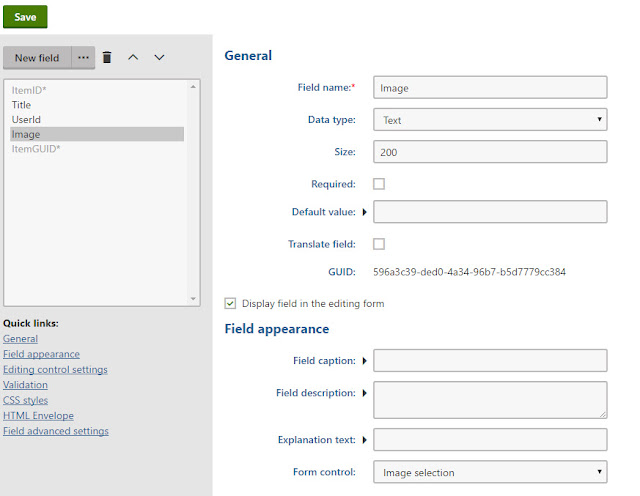
How to display image from "image selection" field in transformation

Image
You can use following sample code: <img src="<%# GetDocumentUrl("Image", "") %>" />

How to add Facebook Open Graph (og) meta tags to blog detail page in Kentico

Image
We can use Head HTML Code WebPart in your Page Template and using macros to populate your tags content. + Configure the WebPart      - Configure the webpart: fbgraph      -  Web part title: Facebook Open Graph      -  HTML code <meta property="og:title" content="{% BlogPostTitle %}" /> <meta property="og:site_name" content="Kentico 9" /> <meta property="og:url" content="{% CurrentDocument.AbsoluteURL #%}" /> <meta property="og:description" content="{% StripTags(BlogPostSummary) %}" /> <meta property="og:image" content="http://{% domain %}/getattachment/{% BlogPostTeaser %}/.aspx" /> <meta property="og:type" content="article" />