Posts

How to exclude column save into database for Contact Form 7 DB

Image
When you submitted form data into database default Contact Form DB will insert all your data form into your database so if you want to exclude field something like Google Recaptcha not insert into database. You just go to Contact Form 7 DB --> Options then click on Save Tab. Add filed name that you want to exclude after "/.*wpcf7.*/,_wpnonce". /.*wpcf7.*/,_wpnonce,g-recaptcha-response

How to add Facebook Open Graph (og) meta tags to blog detail page in Kentico

Image
We can use Head HTML Code WebPart in your Page Template and using macros to populate your tags content. + Configure the WebPart      - Configure the webpart: fbgraph      -  Web part title: Facebook Open Graph      -  HTML code <meta property="og:title" content="{% BlogPostTitle %}" /> <meta property="og:site_name" content="Kentico 9" /> <meta property="og:url" content="{% CurrentDocument.AbsoluteURL #%}" /> <meta property="og:description" content="{% StripTags(BlogPostSummary) %}" /> <meta property="og:image" content="http://{% domain %}/getattachment/{% BlogPostTeaser %}/.aspx" /> <meta property="og:type" content="article" />

Prevent hover on touch screen devices

There are 2 simple ways to check for touch support with JavaScript: You can use Modernizr.js library. Latest versions of Modernizr (2.6.2 for sure) automatically checks for touch support and attaches a .no-touch class to HTML tag, if device doesn’t support touch. If you do not want to use Modernizr, you can add small piece of JavaScript below, which will do exactly the same thing. //touch events support and if not supported, attach .no-touch class to the HTML tag. if (!("ontouchstart" in document.documentElement)) { document.documentElement.className += " no-touch"; }

CSS3 box-shadow Inset bottom only

If you would like put the inner shadow only bottom box. you can use css3 to adjust shadow HTML <div class="box"></div>  CSS div.box {     background:red;     height:100px;     width:200px;     -moz-box-shadow: inset 0 -10px 10px -10px #000000;     -webkit-box-shadow: inset 0 -10px 10px -10px #000000;     box-shadow: inset 0 -10px 10px -10px #000000; }

Contact Form 7: Redirecting on a condition in Additional Settings

Image
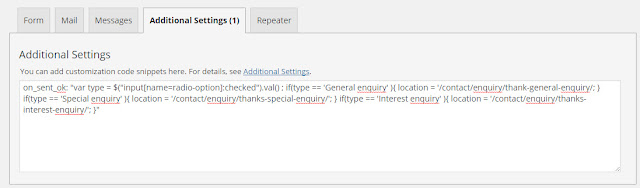
Redirecting without a condition When you use the WordPress plugin “Contact Form 7” you can redirect the user to another page after submitting the answers by the following code: on_sent_ok: "location.replace('http://www.redirectedtopage.com');" Redirecting on a condition If you want to make the redirecting depending on a specific answer, you can use the following code: on_sent_ok: " if (document.getElementById('type').value=='yes') {location.replace('http://www.redirectedpage1.com') } else { location.replace('http://www.redirectedpage2.com/') }" Or on_sent_ok: "var Iso = $("input[name=radio-option]:checked").val() ; if(Iso == 'General enquiry' ){ location = '/contact/enquiry/thank-general-enquiry/'; } if(Iso == 'Special enquiry' ){ location = '/contact/enquiry/thanks-special-enquiry/'; } if(Iso == 'Interest enquiry' ){ location = '/contact/enquiry/th...

How to style style ordered list numbers?

Image
Today I would like to show how to add background-color, border-radius and color to ordered list. if you make your look at nice on your website so it easy way to to like below: 1. HTML <ol> <li>item</li> <li>item</li> <li>item</li> <li>item</li> </ol> 1. CSS <style>     body { counter-reset: item; } ol { list-style: none; } li { counter-increment: item; margin-bottom: 5px; } li:before { margin-right: 10px; content: counter(item); background: lightblue; border-radius: 100%; color: white; width: 1.2em; text-align: center; display: inline-block; } </style> Working Demo

Fixed FTP credentials for WordPress to connect to my local server

Image
I try to update WordPress or download plugins in I am directed to a page asking for the following information: Connection Information To perform the requested action, WordPress needs to access your web server. Please enter your FTP credentials to proceed. If you do not remember your credentials, you should contact your web host. Here is solution how to fix it define('FS_METHOD','direct'); to wp-config.php