Posts
Show/Hide Text in Textbox
<input type="text" name="search" class="form1" onblur="if (this.value == '') {this.value = 'thy4u.blogspot.com';}" onfocus="if (this.value == 'thy4u.blogspot.com') {this.value = '';}" value="thy4u.blogspot.com" />
Joomla! 1.5.15 Released - Get It While It's Hot!
The Joomla! Project announced the release of Joomla! 1.5.15 today . This release contains a couple of security fixes, so be sure and upgrade as soon as possible.
Get the browser width and height in internet explorer
<script type=”text/javascript”> w = 0; h = 0; w = document.documentElement.clientWidth; h = document.documentElement.clientHeight; alert("w: " + w + ", h: " + h); </script>
Removing “Welcome To The Frontpage” In Joomla

The setting for the Page Title is located in the parameters of each Menu Item under "Parameters (System)". For Example to change the Page Title for the Home page of the Sample web site, you would navigate to Menus / Main Menu, click on "Home" to open the Menu Item:[Edit] screen. Then click on "Parameters (System)" to show the System Parameters, and either change the "Page Title" parameter or set "Show Page Title" to "No".
Creating Flash Projects
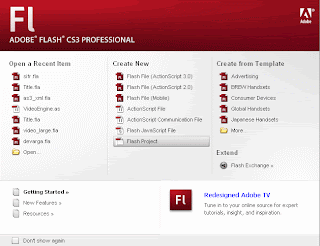
Flash makes it easy for you to create a project. When you open Flash, one of your first options is to create a Flash project. Under the central Create New selection, you’ll want to choose the final option, Flash Project. Select Flash Project to create a new project. The New Project window opens and asks you for a name and location for you new project file (the extension to all Flash projects is FLP). After you’ve created your project file, a new window—called the Project window—opens to list all of the files in your project. What you now have is an empty project folder. At this point, all you have to do is add your folders and files.